



Disambiguation and entity mapping
Disambiguation is a feature that helps hila Conversational Analytics (hCA) clarify user intents when multiple interpretations are possible. This is particularly useful in scenarios where user queries are ambiguous or could relate to several different topics.
When hCA encounters an ambiguous query, it can prompt the user with a list of possible interpretations or options to choose from. This ensures that the system accurately understands the user’s intent and provides relevant responses.
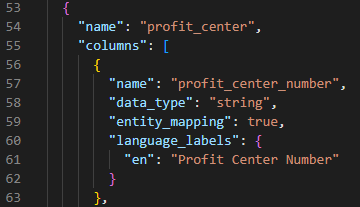
For disambiguation to work, you need to define entity mapping where each table name corresponds to a string you define. This allows hCA to recognize and differentiate between various entities in user queries.
For example, for each entity you want to be available for disambiguation, add the entity_mapping and set it to true and add language_labels with the label you want to appear for that entity:
Procedure
-
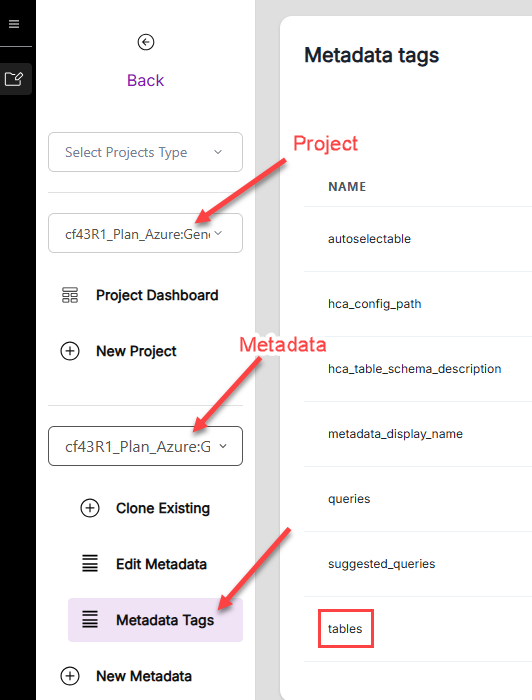
In the hila monitoring app, go to Projects and select your project.
-
Select the metadata source associated with the data you want to configure the entity mapping.
-
Click Metadata Tags and look for the row tables in the list of tags.
-
Click the three dots to the far right of the tables row and click Edit.
-
Scroll through the JSON object and update the entity mapping for the tables you want to be available for disambiguation.