



Edit suggested questions
Suggested questions are pre-defined queries that users can select to quickly get insights from the data without having to formulate their own questions. As an admin, you can edit these suggested questions to better align with your organization’s needs and the specific data being analyzed.
Procedure
-
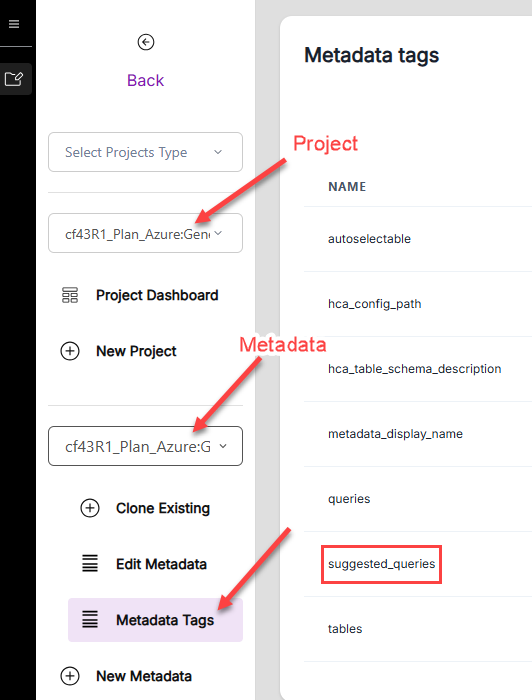
In the hila monitoring app, go to Projects and select your project.
-
Select the metadata source associated with the data you want to edit suggested questions for.
-
Click Metadata Tags and look for the row suggested_queries in the list of tags.
-
Click the three dots to the far right of the suggested_queries row and click Edit.
-
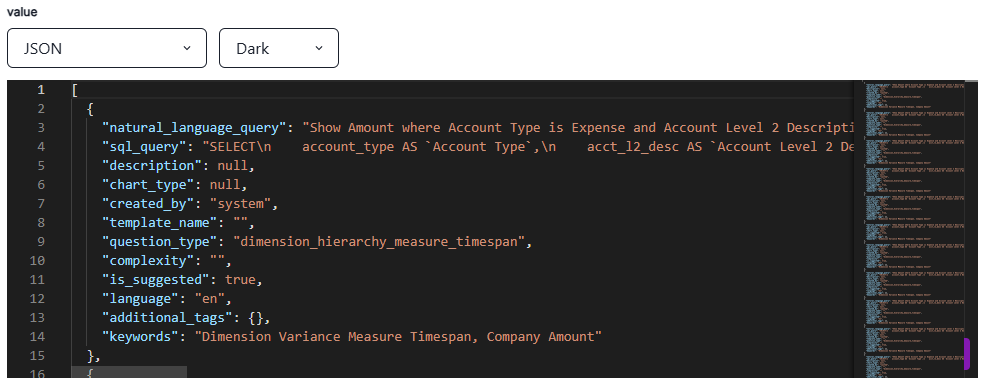
Scroll through the JSON object and update the suggested questions as needed.
-
Click Save Tag to apply the changes.
hCA kicks off a job to update the suggested questions for the selected metadata source. Once the job is complete, the updated suggested questions will be available for users as suggested queries when interacting with an hCA conversation.